Google Gemini Dslr Boys Ai Photo Editing Prompt – In today’s digital age, editing photos with Ai has become incredibly easy. Previously, people spent hours on various editing apps to create DSLR-level portraits or cinematic photos, but now, with the help of Ai, they can create similar photos in just minutes with a simple prompt. And Google’s Gemini Ai plays a crucial role in all of this. Because people can simply upload a selfie and enter a prompt into Google Gemini to create any kind of image with a single click. Google Gemini has revolutionized the world of photo editing. And today’s article is about Ai photo editing with Google Gemini, and we’re going to give you a prompt for DSLR-style photo editing specifically for men. With our provided prompt, you can create your photos with natural skin tones and realistic backgrounds.
Google Gemini Dslr Boys Ai Photo Editing Prompt
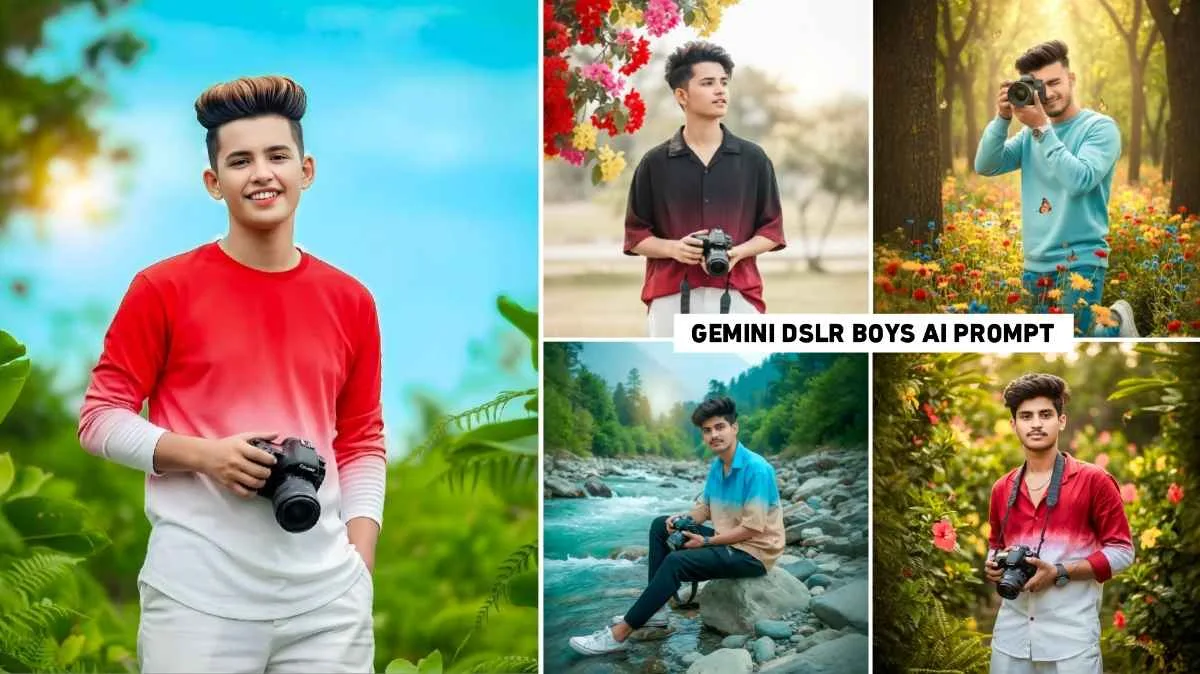
If you want to create photos using a DSLR camera such as outdoor nature portraits, flower field photoshoots, or shots of a photographer holding a camera then using the prompt correctly is very important. You can see some example images in paragraph three. The first photo was shot in a flower field with soft golden light. The other photo was captured against a simple sky and greenery background. We have shown five to six images similar to this. In all the photos the background is soft the colors are vibrant and the subject is in sharp focus. This is exactly the look that Gemini Ai can easily generate. We have provided the prompt for each photo in a box directly below it, which can be copied by holding and pressing on it. After that, you can use it with a selfie photo in Gemini Ai.
Google Gemini Dslr Boys Prompt

A stylish, handsome young man (reference image provided) with light brown hair is wearing a red and white gradient half-lined shirt not tshirt and white loose-fitting pants. He is holding a Canon camera and looking directly at the camera. This is a candid, high-key cinematic outdoor portrait. Lush green foliage surrounds the composition, with a sprig of bright red/pink/yellow flowers. The sky is light blue. Do not alter the face. Keep the facial features exactly as they are.
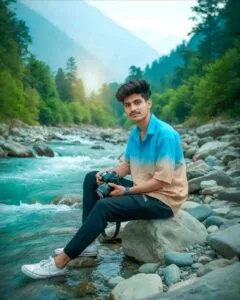
16K ultra-realistic cinematic portrait of a stylish young man sitting on large river rocks beside a fast-flowing turquoise mountain river. His face and hairstyle exactly match the reference image, moreover hair perfectly styled. He looks at the camera with a calm, confident slight smile. He leans back with one hand on the rock, while also holding a DSLR in the other. Wears an oversized short-sleeve button-up shirt with a bright-blue to light-brown ombré effect, along with black joggers, and white sneakers. Natural daylight, sharp details, vibrant colors, realistic reflections, additionally cinematic depth, lush green trees, water splashes, smooth rocks, finally professional color grading.

Hyper-realistic 9:16 cinematic portrait using the uploaded image, keeping the same face and hairstyle. A young person kneeling in a colorful flower field at golden hour, wearing a light-blue oversized sweatshirt and faded denim jeans, holding a DSLR camera to the face. Butterflies flying around, soft bokeh, shallow depth of field, sun rays through trees, natural skin tones, vivid colors, cinematic lighting, HDR, ultra-realistic 8K, editorial nature photography style.
Gemini Dslr Boys Prompt
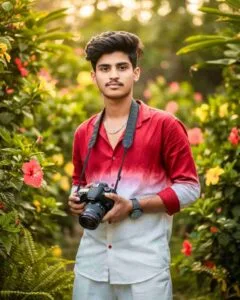
Create a hyper-realistic cinematic photo based on the uploaded image, maintaining the same facial features and hairstyle. An ultra-realistic 8K portrait of a stylish Indian man standing outdoors in a lush tropical garden, surrounded by vibrant foliage and blooming hibiscus flowers (red and yellow). He is wearing a red and white gradient half-lined shirt and white loose-fitting pants. Accessories include a wristwatch, a silver chain necklace, and a Canon DSLR camera with a strap, which he confidently holds in one hand. The background is slightly blurred (bokeh effect) to emphasize the subject.
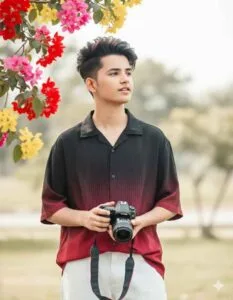
Ultra photo realistic 8K portrait of a 22-year-old young man with the same face of the uploaded photo, sitting confidently in snowy mountains, wearing a dark winter jacket, tactical gloves, and a beanie hat. Beside him stands a majestic grey wolf, also exuding strength and loyalty. Background with snow-covered peaks, crisp cold atmosphere, cinematic natural light, along with realistic textures of snow, fur, fabric, and skin. Powerful wilderness survival vibe, sharp focus, and dramatic detail.
How To Create Any Type Gemini AI Photos
Creating any photo with Google Gemini Ai is a very simple process. You just need a clear idea and a powerful prompt. This will help you easily create the photo, and your face plays an important role because the final image won’t look good unless your original photo is good. Therefore, whenever you upload a photo to Google Gemini, upload one where your face is clearly visible. Gemini understands your text and generates an Ai image. You can try multiple variations and further enhance the result by adding more details to the prompt. We have provided a lot of Gemini-related Ai image generation prompts on this website, which you can find in the AI photo editing category.
How To Use Gemini Dslr Boys Ai Photo Editing Prompt
When you receive any kind of prompt to create a photo, you can easily create the photo using Google Gemini. You just need to decide whether you want to create the photo using the Google Gemini website or the application. If you want to create the photo using the website, we have provided a button labeled “Create Image” in paragraph three. Click on that button. The Google Gemini website will open. Now let’s learn what to do next step by step.
- Once the Google Gemini website opens you need to select the “Create Image” option.
- You will see a plus icon at the bottom. Click on it in the left corner and then click on upload file.
- Now add a picture from your gallery in which your face is clearly visible.
- Paste the prompt that you copied into the message box.
- Now you will see a send icon in the right corner click on it.
- Please wait a moment.
- After waiting for a while your photo will be created.
- Click on your photo and then click on the small download icon at the top to save the photo.
Conclusion
If you also want to create cinematic portrait photos with your DSLR camera without using any editing app or having any editing knowledge, then Google Gemini DSLR Boys AI photo editing prompts are the best option for you. Because by using Gemini, you can easily create photos with the help of prompts without any editing knowledge. Whether you want to create photos for Instagram reels, YouTube thumbnails, or a personal portfolio, Gemini gives you high-quality, cinematic, and natural results all without heavy editing. So be sure to try creating a photo using the prompt we’ve provided in this article.