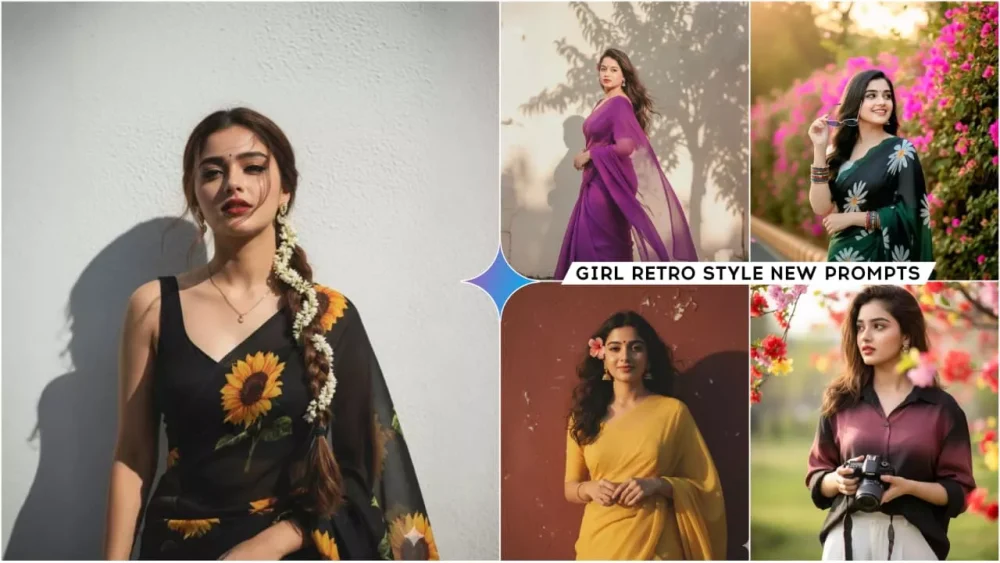
Google Gemini Retro Indian Girls Ai Photo Editing Prompts – It’s been a while, and we haven’t explained anything about this girly editing. Which is very wrong, because I mostly focus on boyish editing here. I’ve explained how to edit it. Which is absolutely correct, and you may have done a pretty good job editing it. But right now, in this article, I’m going to tell you about this girly editing, where you can create a retro or professional photo of an Indian girl. All the photos of Indian girls are going to be amazing. Once you see it, you’ll love it. I’ll tell you. Keep following it.
Details Of These Prompts
You may have noticed that when the Google Gemini trend came out, it was this retro trend that sparked all these trends. At that time, the girls’ photos went viral the most, while the boys’ photos came later, so even among the girls, not many people created such photos. Now, look, I’m not saying that all the photos I’ve provided here are in the same style; you’ll find photos of a completely Indian type. You’ll love them, and they look so natural. You won’t believe how such a beautiful photo can be created. You should know this with Google Gemini. And you can create professional photos of any kind with Google today. All you need is the right prompt. Using the right prompt, you can create a lotus photo. I’m going to explain how we can create such professional photos.
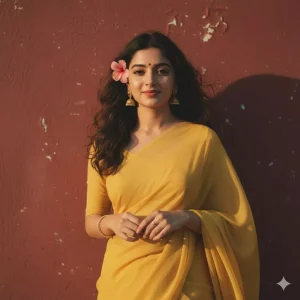
A retro, vintage, and grainy photograph of a girl with a romantic, dreamy aesthetic, reminiscent of a 90s Indian movie. The girl is draped in a plain, yellow chiffon saree, wearing small bindi, and jhumke in the ears, with ring and bracelet in hand, and her dark brown, wavy hair is flowing naturally in the wind, with a single, small, delicate pink flower tucked visibly into her curls. She is standing against a solid wall with deep shadows and
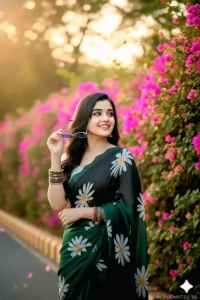
Use 100% face of uploaded image A stylish woman age 25-30 with long, dark brown hair is captured in a half-body shot, looking to her right with a gentle smile and confident expression. She is wearing a vibrant green and black gradient saree adorned with large white daisy patterns. Her accessories include trendy light blue sunglasses with silver frame, which she is holding with her right hand, and a stack of colorful, patterned bangles on her left wrist.

256k ultra HD portrait registration grainy yet bright -based on the reference picture. The girl should be draped in a perfect black-coffee saree with sleeveless blouse with a deep neck Pinterest-style aesthetic retro saree.With sunflower print on the saree. The vibe must capture the essence of a 90s movie brown -haired baddie, with a beautiful long thick braid till my waist with gajra, enhanced by a windy, romantic atmosphere. She stands against a solid wall of white color where de

Create a retro, vintage-inspired image – grainy yet bright – based on the reference picture. The girl should be draped in a purple chiffon saree .The vibe must capture the essence of a 90s movie dark-brown-haired baddie, with silky hair and a small flower tucked visibly into her hair, enhanced by a windy, romantic atmosphere. She is standing against a wall with the shadow of a tree.

Generate an ultra-realistic 8K photo of a young girl wearing a beautiful modern colourful saree,matching half sleeve blouse,modern hairstyle, oxidised jewelry. SHe stands casually near a blooming flower bush, two colourful butterfly and striped concrete road barrier.She is looking at those butterflies,trying catch gently with beautiful smile. Captured in soft natural sunlight with vibrant greenery, giving a candid,modern outdoor vibe.Keep the facesame as the uploaded photo.

A stylish handsome young girl (refrence image given) with a slightly dark messy hairstyle and wearing a lose black & maroon gradient half lineing shirt and white lose pant. Se hold a Canon camera, He is looking thoughtfully off-camera, captured in a candid, high-key cinematic outdoor portrait The composition is framed by a branch of vivid red/pink/yellow/. Don't Change The Face" "Keep Facial Features Same Signature: @rajaneditz.com

Ultra-realistic 4K HD portrait of a young Indian woman with long, dark, wavy hair, styled with white jasmine flowers tucked behind her right ear. She is wearing a translucent black organza saree draped elegantly over her left shoulder, revealing a fitted black sleeveless blouse underneath. She is looking to her right with a gentle, slightly smiling expression. A warm, directional spotlight from the left casts a soft, distinct shadow of her profile on a plain, warm orange-brown...
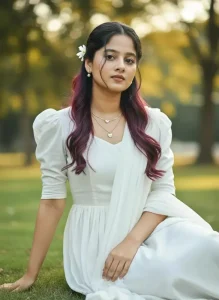
Use this face and create a realistic stunning HD portrait of a beautiful young woman wearing a puffy shoulder white long dress,maching chunri,small pearl tiny earrings,two steps chain with love sign locket, brown eyes,subtle makeup,no bindi,slightly burgundy black highlighting long wavy bouncy hair styled in loose bun,some of hair falling on her face, sitting on her knees gracefully.There will be a white flower on one side of the head,background autdoor.don't chenge fece
Create Product Showcase With Google Gemini
Now, using Gemini, you can create a photo or video showcasing your products. You can do it very easily. This is going to be very easy for you. If you want to create a photo for a product, first upload your product and then write in Hindi, “Look, brother, this is the product in our photo.” Along with this, we need a professional model. You can specify the model’s image, and you can specify whether it’s male or female. Write there that our background should be of this type: black background, white, or studio-style. Describe it in this way, meaning whatever you need with your product and the model.
Write it there, then generate and see. It will prepare the photo for your professional product. If you want to create a photo of a product, you just need to describe that the background of your product should be like this. Its reflection should be like this. The lighting should be like this. That’s why you’ll see it. Currently, photos of this product are also going viral on Instagram.
How To Use Google Gemini Retro Indian Girls Ai Photo Editing Prompts
You use the prompt. If you want to create a photo, it’s quite simple. You just need to copy the prompt and use it. For this, you can select and copy it, or copy it using the copy button. It’s up to you which method you choose. For me, it would be simple to click the copy button and copy. Now, if we’re using Google, you’re given a browser application for Gemini. I recommend selecting the browser, as I’ve added a direct link below. You can go there directly. I also want to point out that this isn’t a sponsored post for Google Gemini. I’m sharing this for my subscribers so you can create your own photos from there. Now, go to Google Gemini.
First, you’ll find the Create Image option below. Select it, then the option to write appears. Paste the copied prompt there. You paste it there, then go to the “Plus” option and select your photo. You can upload your selfie or any other photo, then click “Generate,” and it will create your cool photo.
How To Create Different Style Photos Google Gemini?
Google Gemini is a multi AI tool. It means you can create any type of photo with it. If you want, you can change the lighting in it. You can make it sideways. You can create it in dark mode also. The best thing is that if you want, there are different cartoons in it. You can change the style also. You can make it in Pixar style. You can make it in anime style. You can make it in 3D. All you have to do is, at the end of the prompt, you have to add the style in which you want the photo. Convert my photo in Pixar style and what will it do. It will generate your photo in that style, everything will be done. Just the style of your photo will be changed there.